BinTree
A BinTree is a structure used to represent the Binary Search Tree data type. A BinTree is a recursive structure that consists of a key field and two BinTree pointers, right and left.
typedef struct binary_tree_t {

    int key;
    struct binary_tree *right;
    struct binary_tree *left;

} BinTree;
Instantiation
We can create a new BinTree node by calling newBinTree. This function creates a fresh BinTree node that can be used as the root of a Binary Tree.
BinTree *root = newBinTree(10) // Create a new BinTree whose key is 10
Insertion
We can add on elements to the BinTree with addKeyBST. This will add a new node in the proper position to conform to the behavior of a Binary Search Tree.
addKeyBST(root,  1); // Adds 1 to the left of 10
addKeyBST(root, 13); // Adds 13 to the right of 10
addKeyBST(root,  0);
addKeyBST(root,  5); // Adds 5 to the right of 1
addKeyBST(root,  8);
addKeyBST(root, 25);
addKeyBST(root,  3);
Visualization
A BinTree can be visualized using the dot language. We call the function createDotBST to output a new .dot file that encodes the connectivity of the tree. We can use a command of the form dot -Tpng <my_input.dot> -o <my_output.png> to create an image of the tree:

Deletion
Deletion can be carried out with a simple call to removeKeyBST. Here, we will demonstrate the functionality of the function by showing the BST's connections after each operation.
removeKeyBST(root, 3);
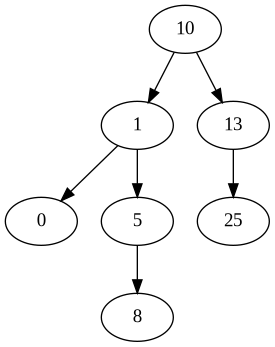
removeKeyBST(root, 13);
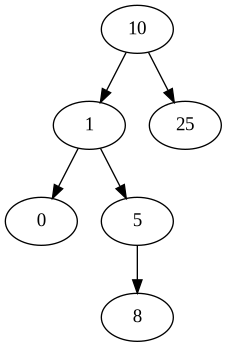
removeKeyBST(root, 1);
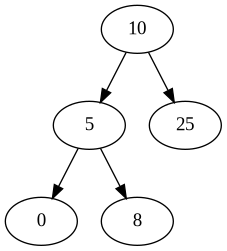
With these three examples, I've implicitly displayed the 3 possible cases that we encounter when wanting to delete a node. In the first case, we have a node with no child elements. In the second case, we have a node with only one child. Finally, when removing the key 1, we observe that the node has two children. Each situation requires a different strategy for rearranging the tree to remove the intended node.
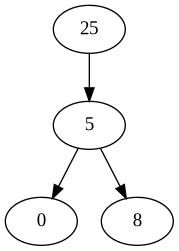
Removing the root node is actually just a special instance of the third case:
removeKeyBST(root, 10);
Random Trees
We can start of with a shuffled set of the integers {1, ..., N} and create a BinTree from this data. To do so, simply call
createRandomTree:
BinTree *rando = createRandomTree(10);
createDotBST(rando, "rando.dot");
Now we can execute dot -Tpng rando.dot -o rando.png to create the following graph:

If we want to have some more fun, we can ramp up the N value in our call to createRandomTree. Let's check out a graph with N = 140.

Rad.